I've been messing around with Adobe Lightroom 4 and SQL Lite recently trying to find a way to glean some useful information from my library catalog. Why? To learn something about it, to learn some new skills and why not.
So I downloaded SQLLiteSpy and hooked it up to my Lightroom catalog.
WARNING: don't do this while Lightroom is running or you could hose your catalog. It's always best to make a copy of one of your backup catalogs first, then work with that one. Really test the beejezus out of anything that does write operations.
DISCLAIMER: I will not be held responsible for anything that you do to your catalog, images, computer, mental health, others, etc.
OK, if you are still reading and want to play around with your catalog then try hooking up SQLLiteSpy to your Lightroom catalog. You will have to tell it to look for .lrcat file extensions so pick "Any file".
You should see a whole bunch of tables with Adobe or Ag prefixes. This is good.
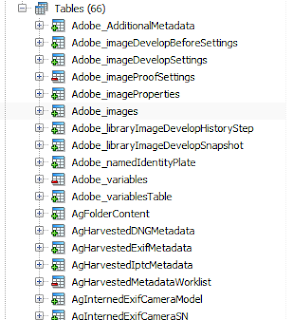 |
| Adobe SQLLite database |
There are many interesting tables but you should first look at Adobe_images, AgLibraryFile, AgLibraryFolder and AgLibraryRootFolder. These tables are a great place to start and figure out the relationships of the data.
I was fiddling about with these tables and came up with the following query:
SELECT
root.absolutePath || folder.pathFromRoot || file.baseName || '.' || file.extension AS "FILEPATH"
FROM AgLibraryFile file
JOIN AgLibraryFolder folder ON file.folder = folder.id_local
JOIN AgLibraryRootFolder root ON folder.rootFolder = root.id_local
;
This query will show you the paths for all your images in the catalog.
Date and Time
I found that dates were the trickiest bit to figure out. Lightroom uses the SQL Lite REAL data type but there is absolutely no documentation on how they store it. I searched high and low on the internet and didn't come up with anything useful.
Using SQL Lite to find the current time you can do something like the following.
SELECT datetime('now', 'localtime');
But to figure out how Lightroom actually stores dates and times took some more effort. I read all the documentation on SQL Lite dates and times, searched all over the place for tutorials, etc. and came up with squat. It's like a coveted secret like the holy grail or how they get the caramilk inside the chocolate bar.
Well here it is, here is the secret. They use the year 2001 as their epoch. Weird! Anyway to calculate a date you need to do the following:
SELECT modTime, datetime(modTime,'unixepoch','localtime', '+31 years') FROM AgLibraryFile;
- localtime adds/subtracts your timezone offset
- unixepoch uses the unix start date of 1970-JAN-01
- +31 years adds 31 years to the unixepoch to make it 2001
This will give you a proper date based on your timezone offset. Horray!
Advanced
Now, what I really wanted to attempt isn't available in Lightroom, so I thought I would write a query to do it. I wanted to get a set of records that were exported to my hard drive within the past 90 days. Why? Why not, and I might be able to use some kind of script (Perl, bash, batch, etc.) to work with that data. I wish Lightroom had this functionality. Maybe the Lightroom gods will listen and add this in a future release...
SELECT DISTINCT
  root.absolutePath || folder.pathFromRoot || file.baseName || '.' || file.extension AS "FILEPATH"
FROM AgLibraryFile file
JOIN AgLibraryFolder folder ON file.folder = folder.id_local
JOIN AgLibraryRootFolder root ON folder.rootFolder = root.id_local
JOIN Adobe_images image ON image.rootFile = file.id_local
JOIN Adobe_libraryImageDevelopHistoryStep step ON step.image = image.id_local
WHERE julianday('now', 'localtime') - julianday(step.dateCreated,'unixepoch','localtime', '+31 years') <= 90
AND step.name LIKE ('Export - H%')
;
Good Luck.


